Showing posts with label Google. Show all posts

GOOGLE’S VoIP SERVICE , You can too getit at affordable costs !

Yeah, you got that right. Google has all of its own VoIP service. This service is called GTalk2VoIP. It offers you to communicate between different IMs, Skype and even phones, landlines and mobiles. You can have your own number and can receive calls from landlines and mobiles on your GTalk. This is through the SIP Broker system. However, this feature is not available in all countries. While most of the Google VoIP services are free, some are paid service like making outgoing calls and SMS. This service is somewhat similar to Skype.

Just you pay from Paypal or Webmoney

Ter r loads of cool n cost cutting features !!
Voice calls between Google Talk, MSN/Live Messenger and Yahoo!
Voice mail service, interoparable between major IM clients.
Voice conferencing: with any number of participants of any IM type.
Sending off-line messages and notifications.
Calling SIP phones and SIP services.
Receiving calls to your IM from any SIP phone.
Receiving calls to your IM from mobile or landline phones using SIP Broker.
Receiving calls to your IM from web users.
Free toll-free calling to 1-800, 1-866, 1-877 and 1-888 numbers via SIP Broker.
and Paid voice services:
Outgoing calls from your IM to any telephone numbers throgh a number of VoIP carriers.
Incoming calls to your IM from any phone number (PSTN DID assignment).
Sending SMS messages from your IM to any mobile phone number.
Just check it out at www.gtalk2voip.com

How To Open Multiple ID in Google Talk


YOU CAN SEE 3 gtalks opened by me ! u can tooo
By default, we can open only one instance of Google Talk. This limits us to be online in a single Google Talk ID at a given time :(

Suppose you want to be online in multiple Google Talk ID's at the same time, :) then how will you achieve it? The trick is very simple and takes just few seconds to implement.

Just follow few steps as shown below...

1. Place a google talk icon on your desktop & Right-Click Select properties from context-menu navigate to "SHORTCUT TAB" in this concentrate on the "TARGET" option by default it is having the address like this

"C:\Program Files\Google\Google Talk\googletalk.exe" /startmenu

2. All you need to do is just replace that address to below address
"C:\Program Files\Google\Google Talk\googletalk.exe" /nomutex

3. Click Apply and OK then your done.

15 awesome tricks you can use Google search engine

Below is a summary of 15 awesome tricks you can use Google search engine for:

  • Google Calculator
  • Dictionary Definitions
  • Search for a specific title
  • Google Converter
  • Compare Currencies
  • Weather Updates
  • Search for specific file types
  • Search on a particular website
  • Get the local time anywhere
  • Remove unwanted search results
  • Search for URLs
  • Track Flight Status
  • Search Google Groups by the subject line
  • Find related sites
  • Find Links to a specific URL

Convert PDF to HTML in Gmail

This trick will teach you how to convert your PDF files into HTML. Not only that, you can even read your PDF as HTML right in your browser without having to download it.
Not only that, you can even instantly convert PDF documents, OpenOffice Document Formats (Writer, Calc, Impress, Presentation) and WML Files (Wireless markup language), Microsoft Office Document formats (MS Word .doc, Excel .xls, Powerpoint .ppt, Rich Text Format .rtf) to HTML.

Here’s how it done

1. Compose a new message in GMail.

2. Attach any PDF or Microsoft/OpenOffice document that you want to convert to HTML.

3. Enter your own email address in the To: box

4. Click Send ( Don’t forget to put the Subject).

5. You will receive a message in your GMail Inbox folder that you sent.

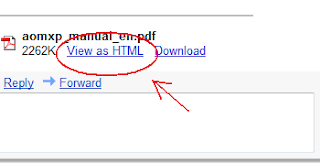
6. Open the message and click the “View as HTML” link next to your attachment.

Convert PDF to HTML in Gmail

Your attachment appear as HTML will open in a new browser.

Note: If there are images in this attachment, they will not be displayed.

Alternative ways

Convert PDF to HTML online for free

Adobe.com - Converts your PDF to HTML online.

PDFescape.com - Converts your PDF to HTML online, edit your PDF, text, add arrows, add shapes and create PDF from any from any files.

Samurajdata.se - An online viewer, with which you can view PDF and PostScript files as browsable images and Word documents as web pages.

Copyright © 2009 - tech it online - is proudly powered by Blogger
http://qwertyweb.blogspot.com/ - Downloads - QWERTYWEB - Techno blog