Showing posts with label Tricks. Show all posts

XP loffoff login loop solution !


Its a common or rather a popular hardcore slap of windows in which the xp gets the problem that when an user switched on his pc ,and when he tries to login his xp will

automatically logoff within few seconds


This is what popularly called as loggin log off loop ,this problem is faced my most of the people and even me !! i had this problem fixed two times and i have awesome experience ,you will have same problem even when you try to open xp in safe mode

Sources :
1> VIRUS
2> ANTIVIRUS
3> SPYWARE
4> OTHER THAN THESE

What to do :
DOnt panic ,your data is not gonna be deleted !
It is very very much safe ! <>
yeah sometimes even c: can be recovered but you may need to kill your patience and opt for other techie geek method
best think i tell you is that in most websites ,there are 100's of methods given ,
you can do read and have fun
they are all copied ori must say are not that what they seem to do
likechange registry keys ,install tht ,rename this
i agree with few of em ,ut the best i say is if you have internet and other good active OS ubuntu > > i love it ,xp ,vista on other harddisc or clened partition >
Well its good even if you have problem in xp ! ,you can use linux like me ,i used to operate that while my xp was suffering ,you can easily get linux aka ubuntu free !
myou need to download xp again
then onw method i have known fmmy frnd
suppose you have 80gb harddisc , you can create upto 3 to 5 gb partition only for xp which you gonna install
and other maybe 7 to 17 gb for programme files you will install
so this will mean ,that even if u get ur xp screwedby virus ,you will infect only your other drv where you have installed programme file , so even if that will occur ,no need to install again xp ,simply format d: and yyo ,you can again install again ,c: willl be safe , more safe than what you had before !

Final fully solved and working solutions :
1> format and install xp as i have told you the way its da best
2> do some killer research at this site

choice is yours !
BESTEST of the luck ! :)


Edit Any Web Page Live in Your Browser ,like a HACKER ;)


Paste a simple code into the location bar and you can actually edit any page on any site in realtime. Though this sounds like fun, it can have serious implications.

the magic code spreading across the web which can edit any webpage

javascript:document.body.contentEditable='true'; document.designMode='on'; void 0

Simply copy and paste it into the location bar of your  web browser

when you are on any page and you can now edit it. Though this is a cool tool to have some fun, it is dangerous tool used by scamsters to create fake screenshots and websites resembling the original to misinterpret facts and for phishing attempts. So you need to be alert on the web and not believe everything you see…

You don’t actually need to remember that code - To make this process faster, use the Edit Page

bookmarklet (drag to your browser bookmarks toolbar, and click when needed). Try it on this page now by simply placing the cursor on any text, deleting it or editing it. These edits are not permanent and limited to your browser window only. Refresh the page and its gone. 

 Techzilo lists many such bookmarklets to modify webpages.

I checked that this code works on Internet Explorer,firefox ,opera ,and Safari. Although it is easy to edit any page by altering its html code .his real time editing is amazing. Opera web browser also has a built in special feature to do this - View > Source, edit in Source Editor and “Apply Changes”.

Firefox users can also try the Firebug firefox extension, a powerful tool that lets you edit, debug, and monitor CSS, HTML, and JavaScript live in any web page, and is popular among webmasters and the web designers. Greasemonkey is another popular firefox extension that modifies the web and allows you to customize the way a webpage displays and functions using small bits of JavaScript.


On CopyPasteTool - Easy Copy And Paste Tool

This small tool allows to save several values of text in clipboard and paste them. Use standard keys for copying (CTRL+C) and pasting (CTRL+V) as usual, but if you want to paste previous text in clipboard then simply press V again and don't release CTRL. It's free.

This is a great tool ,recommended for every computer user. It is basically a clipboard tool, which remembers the previous data and provides an easier way to use theminstall it and start saving texts to clipboard with the usual command Ctrl + C. To paste the latest saved text just hit the usual Ctrl + V. If you want to paste previous texts in clipboard then simply press V again and again without releasing CTRL key. Simple!CopyPasteTool is a really small tool (just 701 bytes) which will increse your productivity. It saves several values of text in clipboard and paste them without any extra effort. You don’t need to use any special shortcut ket or mouse movement to use the tool.

Use these temporary id'z for new websites

EMAIL SERVICES  are very important as they are used in our daily life for checking mails and networking with our friends or messaging someone privately.You  must have seen how to receive blocked webpages using email service and also should have read about custom date time email service.

Now,registering to any new website with your email id can be sometimes risky because of the spams you will receive from that unknown site.Moreover those unknown sites will circulate your email to other sites for some money,the result will be spams over and over again.There are a lot of spam bots and mail harvesting programs which will check the whole internet and your emailid will be caught and spammed with no mercy.Gladly most of the mail service throw them to the spam box but still you need to try having the utmost privacy as possible when it comes to your official mail id.

But another alternative is to opt for temporary/fake mail id.The reason of having temporary mail which is disposable are quite simple

1. You don’t need to register to create a temporary mail id

2. You can register in any website using this temporary mail id which will protect your email privacy

3. The messages in your temporary disposable mail id will be automatically deleted after certain period of time.(inbox messages gets disposed/deleted )

4. You can check the mails instantly using this service.

When you can signup to any site/forum then they may ask for activating the account by logging into your email id and clicking on activation link.Instead of giving the original mail id service,you can provide temporary disposable id so that you will also activate the account and will be protected from being spammed.But there are some sites which also prevent using temporary id’s.

There are thousand’s of services which provide free temporary id which is disposable but here are some of the best I recommend.these are da best ! 

i have used 3 of em , but not all are always +ve , it depends on  server  0.o

Mint Email – Provides four hour temporary email address.Apart from Instant Notification on mail they also have Automatic email Verification which means you no longer have to click on the URL link to verify the email

Mailinator – Most used temporary mail id service.Visit mailinator and type in the email name where is says "Check your inbox!", then click "Go!",Mailinator will display the list of email waiting.Also anyone can see an email if they know the name of your fake mailinator id.

Email Bugmenot – Another instant disposable email service.Emails are auto deleted within 24 hours.

Lite drop - Provides disposable e-mail addresses which expire after 60 Minutes,you can request for a random temporary id or you can create your own in couple of seconds.Also has automatic e-mail check option activated.

Guerilla mail – Works same as Litedrop and but email gets deleted in 15 minutes.you can set the option to increase the disposing time to 1 hour.

Jetable – Create life span of your mail id and get those are actually forwarded to your orginigal mail account.They even have Firefox addon which can be downloaded from here.

Spam box – Another top temporary e-mail address service which generates you a temporary @spambox.us e-mail and allows you to set the disposing life span of emails received!

Top Ten Tweeter Tools <4T'z> :)

Twitterholic:A directory of Top twitter user according to their Fan followers


TwitterGrader: Just like schools grade ,you will get twitter grade  , it sounds funny but its the most bette rtool i have seen yet , much better than twitterholic ! TwitterGrader will grade your account from 0 to 100 based on your account’s followers, following and number of tweets. You will also be given a rank, this will measure the impact of your account on the twittervilla.

TweetStats:  Statistics for your Twitter account, this tool gets you statistics of your account ,ie  the amount o tweets of your account, the amount of replies and dms and ranking and all that stuff

TwitterFriends: Clever  Twitter statistic tools, with just your twitter username you can find  kewl  impressive statistics, with no need of password
ReTweetRank: This ranks your account based on the number of retweets you get, you will require just id not password 

NearbyTweets: Want to find tweeples near you? This tool finds people who tweeted near you, great tool for discovering new members to follow.

Twitoria: As time passes by and your “following” list becomes longer, there are bound to be a lot of spammy, unwanted, not used accounts, this tool tells your which of the accounts your following hasn’t updated recently in the last week, month or year and other time spans.

FriendOrFollow: Find out who isn’t following you back with this tool , no password required , you can check who has which fans or who is not following whom  , i use it the must but now switched to buzzom

Buzzom: This is best ! most bestest  than FriendOrFollow  !  you only chk it out both , and you will get it 

Tweetwasters: How much time do you spend on Twitter? This tool will tell you and only requires your username. ,  it sounds crappy but is a funny idean work haa 

these are my top 10 , any more that looks like should be added ?

GOOGLE’S VoIP SERVICE , You can too getit at affordable costs !

Yeah, you got that right. Google has all of its own VoIP service. This service is called GTalk2VoIP. It offers you to communicate between different IMs, Skype and even phones, landlines and mobiles. You can have your own number and can receive calls from landlines and mobiles on your GTalk. This is through the SIP Broker system. However, this feature is not available in all countries. While most of the Google VoIP services are free, some are paid service like making outgoing calls and SMS. This service is somewhat similar to Skype.

Just you pay from Paypal or Webmoney

Ter r loads of cool n cost cutting features !!
Voice calls between Google Talk, MSN/Live Messenger and Yahoo!
Voice mail service, interoparable between major IM clients.
Voice conferencing: with any number of participants of any IM type.
Sending off-line messages and notifications.
Calling SIP phones and SIP services.
Receiving calls to your IM from any SIP phone.
Receiving calls to your IM from mobile or landline phones using SIP Broker.
Receiving calls to your IM from web users.
Free toll-free calling to 1-800, 1-866, 1-877 and 1-888 numbers via SIP Broker.
and Paid voice services:
Outgoing calls from your IM to any telephone numbers throgh a number of VoIP carriers.
Incoming calls to your IM from any phone number (PSTN DID assignment).
Sending SMS messages from your IM to any mobile phone number.
Just check it out at www.gtalk2voip.com

Firefox Makes Blogging Easier ,top 8 ADDONS :)


SribFire

ScribeFire is a full-featured blog editor that integrates with your browser and lets you easily post to your blog. You can drag and drop formatted text from pages you are browsing, take notes, upload images, and post to multiple blogs. And the best part is that is supports almost all kinds of blogging platforms.

Download

MorningCoffee

If you routinely visit several blogs or websites as soon as you wake up (like check your stats or AdSense earnings), then this plugin is for you. It basically lets you open websites in tabs that are a part of your everyday ritual, in one click. This extension also lets you organize websites by day, which is handy if you follow a different routine on Sunday, than, say, Tuesday.

Download

Read It Later

Read It Later allows you to save pages of interest to read later. It eliminates cluttering of bookmarks with sites that are merely of a one-time interest. Also, it has many other options integrated for our use.

Download

Shareaholic

So what do you do after posting a blog post? You promote it, don’t you? Well, this plugins eases your job as Shareaholic allows you to quickly share, bookmark, and email web pages across many web 2.0 social networking and bookmarking sites such as Digg, Delicios, Reddit, StumbleUpon, Twitter, Mixx and many others without cluttering up your browser with multiple toolbars and buttons.

Download

ReminderFox

Tied up in other works? Forgot to pay rent? Didn’t make a blog post? These are tasks you tend to forget when blogging or when you have a busy schedule. ReminderFox displays and manages lists of date-based reminders and To-Do’s. It makes sure you remember all of your important dates via easy-to-use lists, alerts, and alarm notifications.

Download

SeoQuake

SEO matters a lot in blogging. Especially when you are commenting or looking for keywords for your blog post. Are you keeping an eye on your competitor? Why not, use SeoQuake as it helps you to better optimize your blog for search engines. It shows detailed information about your competitors, such as their PageRank, the number of pages of their blog indexed in Google, AlexaRank, WhoIs info, and many more similar SEO parameters. Using this data you can know what you can do clinch that top spot for a keyword.

Download

FireFTP

Adding images to your blog post? Editing a theme? Or simply uploading new plugins. Now there is no need to open your heavy FTP programms. Along with transferring your files quickly and efficiently, FireFTP also includes more advanced features such as directory comparison, syncing directories while navigating, SFTP, SSL encryption, search/filtering, integrity checks, remote editing, drag & drop, file hashing, and much more…

Download

IE Tab

Working on a theme? Do you want to check how it may look in the average Internet Explorer? No need of opening the I.E again and again. This plugin may also be useful when you want to open IE specific websites such as Windows Update.

Download

i got above after loads of googling !


Getting Links for Writing Content and adding loads of Traffic on blog


1. Write content that is useful - Writing resourceful content will always attract links, hands down. If you write an article that is overflowing with useful and resourceful information - people will link to it.

2. Don’t forget trackbacks - This handy feature for Wordpress can be great way of returning the compliment for a dedicated link. On blogger there are too many widgets n changinf HTML will do the work

3. Remind your readers to link to you - After each posts, just throw in a quick reminder that your article can be socially bookmarked or linked to.

4. Spread the Love - Dedicate a post or two per week to link to other blogger’s posts that you found useful. More often than not, they will tell their readers “Mr.X linked to my post, how cool!” :)

5. Trade articles with webmasters - Similar to guest posting, just swap articles with a fellow webmaster.

Link-Baiting

6 Hold a contest with an incentive. Contests are great for link-baiting because when people talk about it, there will always be “Check it out here” tagged along with it.

7 Release a free design. If you can make/buy a custom WP-Theme then release it for free to your guests, you can really kick off on a viral market. Just don’t forget the “Designed by [YOUR LINK]” that will remind everyone of your site and whenever wordpressers wanna get this theme they will straight a way go2 ur blog !

8. Release a free plugin/widget. This serves a similar purpose as a design, but not so much with a direct back-link. Instead, if your plugin/widget is useful, the incoming links will just grow exponentially.

9. When running a contest, reward your referees that bring the most referrals. This will encourage them to blog about your contest.

Connecting With Communities

10. Become active and post on relevant forums

11. Become active and comment on relevant blogs, but dont spam

12. Try not to forget your signature on forums, otherwise the whole thing is an epic fail.

13. When commenting on blogs, try to use post URLs instead of just your Blog URL - This can help regulate your links evenly amongst your blog, and not just solely to your front page.

14. DON’T spam communities with your links to your site, offer a reason for them to visit and contribute with a purpose.

15. Submit your blog to directories - These are still helpful when it comes to getting indexed, especially these directories listed here.

16 Search up DoFollow Blogs/Forums - These will carry the most significant back-links.

17 Browse Craigslists and they can provide you with a free or cheap link.

18. Build on your Technorati Profile

19. Become a Sponsor - Whether it be a theme, whole website or a small project; the sponsors always get mentioned.

20. Run for Charity, and request others to help spread the word, i dont think any of you will do it !! still even you do ! its good for you !

Directories, Social Bookmarking + Discussion Groups.

21. Write content for Article directories - Publish content for directories such as eZineArticles, GoArticles or iSnare. In the “About Author’s” area, you can leave a link to your website.

22. Build a Squidoo Page - It’s easy and if you have the time to develop it, it can be very authoritative. If you don’t there’s heaps of services out there to help you out.

23. Join Discussions over at Yahoo! Answers - Providing useful answers, along with a link is an easy way to earn a back-link. Similarly Google answers

24. There’s also Google Groups - It’s almost the same as Yahoo! Answers, but owned by Google.

25 Submit your voice on Digg - First build a solid profile, where you have a network of loyal diggers. If you can hit the Digg front page, you are likely to get linked to by a lot of web-masters.

26 Build on your Twitter profile then link to your site using your “Bio Area.”

Direct Link Building

27. Contact your fellow bloggers with a personalized email - asking for an reciprocal link exchange. However, keep this to a minimal and be very selective in who you choose to trade with.

28. Post around on forums asking for reciprocal link exchanges, but yet again be warned on your selection.

29 If you are a part of organizations, clubs or schools - Ask them if they can link to you, because these types of websites are more often than not; authoritative.

37. DON’T ask Yahoo, MSN and Google for back-links. It’s just a waste of time, lol , You will get backlink automatically if you blog well !

Paid Link Building

I hate this ! no info about this ! If you are a billionaire ! kewl ! go on paying bux for acklinks ! i will go for points 1 to 36 !
IF U NJOYD IT , commment n letme know more ! :)

How To Open Multiple ID in Google Talk


YOU CAN SEE 3 gtalks opened by me ! u can tooo
By default, we can open only one instance of Google Talk. This limits us to be online in a single Google Talk ID at a given time :(

Suppose you want to be online in multiple Google Talk ID's at the same time, :) then how will you achieve it? The trick is very simple and takes just few seconds to implement.

Just follow few steps as shown below...

1. Place a google talk icon on your desktop & Right-Click Select properties from context-menu navigate to "SHORTCUT TAB" in this concentrate on the "TARGET" option by default it is having the address like this

"C:\Program Files\Google\Google Talk\googletalk.exe" /startmenu

2. All you need to do is just replace that address to below address
"C:\Program Files\Google\Google Talk\googletalk.exe" /nomutex

3. Click Apply and OK then your done.

15 awesome tricks you can use Google search engine

Below is a summary of 15 awesome tricks you can use Google search engine for:

  • Google Calculator
  • Dictionary Definitions
  • Search for a specific title
  • Google Converter
  • Compare Currencies
  • Weather Updates
  • Search for specific file types
  • Search on a particular website
  • Get the local time anywhere
  • Remove unwanted search results
  • Search for URLs
  • Track Flight Status
  • Search Google Groups by the subject line
  • Find related sites
  • Find Links to a specific URL

Multiple login in yahoo messenger

You can login with multiple ID's on the same yahoo messenger.

Follow these steps : ==>>


* Go to Start ==> Run ==>> Type regedit,hit enter

* Go to HKEY_CURRENT_USER ==>> Software ==>> Yahoo ==>> pager ==>>Test

* On the right pane ==>> right-click and choose new Dword value .

* Rename it as Plural.

* Double click and assign a decimal value of 1.

* Now close registry and restart yahoo messenger.

* For signing in with new id open another messenger .

Enjoy ...!!!

Run all browsers with out installing on your computer.


You might find it difficult browsing, when you are not surfing/browsing in your favorite browser.
And when you go outside ,they might not have installed your favorite browser,then …now you need not suppress or satisfy with that browser, you can carry your favorite browser along with you in USB,without installing it you can run it on any machine.
Yes! is it that good! okay,here is way to have all browsers.
xenocode providing with all types of browsers like IE6,IE7,IE8 and for the browser Firefox……Firefox2 and Firefox3 versions,opera,safari and of course latest browser chrome browser also.
To download all browsers here http://www.xenocode.com/browsers/

Convert PDF to HTML in Gmail

This trick will teach you how to convert your PDF files into HTML. Not only that, you can even read your PDF as HTML right in your browser without having to download it.
Not only that, you can even instantly convert PDF documents, OpenOffice Document Formats (Writer, Calc, Impress, Presentation) and WML Files (Wireless markup language), Microsoft Office Document formats (MS Word .doc, Excel .xls, Powerpoint .ppt, Rich Text Format .rtf) to HTML.

Here’s how it done

1. Compose a new message in GMail.

2. Attach any PDF or Microsoft/OpenOffice document that you want to convert to HTML.

3. Enter your own email address in the To: box

4. Click Send ( Don’t forget to put the Subject).

5. You will receive a message in your GMail Inbox folder that you sent.

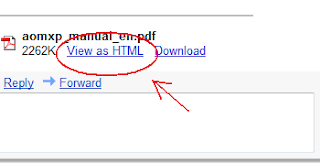
6. Open the message and click the “View as HTML” link next to your attachment.

Convert PDF to HTML in Gmail

Your attachment appear as HTML will open in a new browser.

Note: If there are images in this attachment, they will not be displayed.

Alternative ways

Convert PDF to HTML online for free

Adobe.com - Converts your PDF to HTML online.

PDFescape.com - Converts your PDF to HTML online, edit your PDF, text, add arrows, add shapes and create PDF from any from any files.

Samurajdata.se - An online viewer, with which you can view PDF and PostScript files as browsable images and Word documents as web pages.

Copyright © 2009 - tech it online - is proudly powered by Blogger
http://qwertyweb.blogspot.com/ - Downloads - QWERTYWEB - Techno blog